
3 Best Usability Testing Tools for Mockups and Wireframes
Spoiler: two of them cost nothing and boot up instantly
 By Tristan Kromer ·
 I was recently asked “What’s the best usability testing tools for wireframing?” I’ve used quite a few, including Balsamiq, Photoshop, omnigraffle, and even MS Word. I’ve come to a pretty strong opinion on the best tools for the job:
3) Balsamiq
Balsamiq is great for the simple reason that it doesn’t look great. The drag and drog search menus, drop downs, maps, and so forth all look like a hand drawn sketch. For whatever psychological reason, this means that the customer can look at the sketch without bothering to comment on the shading, the colors, how round the corners are, etc. They focus purely on the functionality and the information architecture.
- Can they find the button they are looking for?
- Can they understand the information being conveyed?
As a bonus, you can link several mockups together to have a crude but clickable prototype.
2) A piece of paper
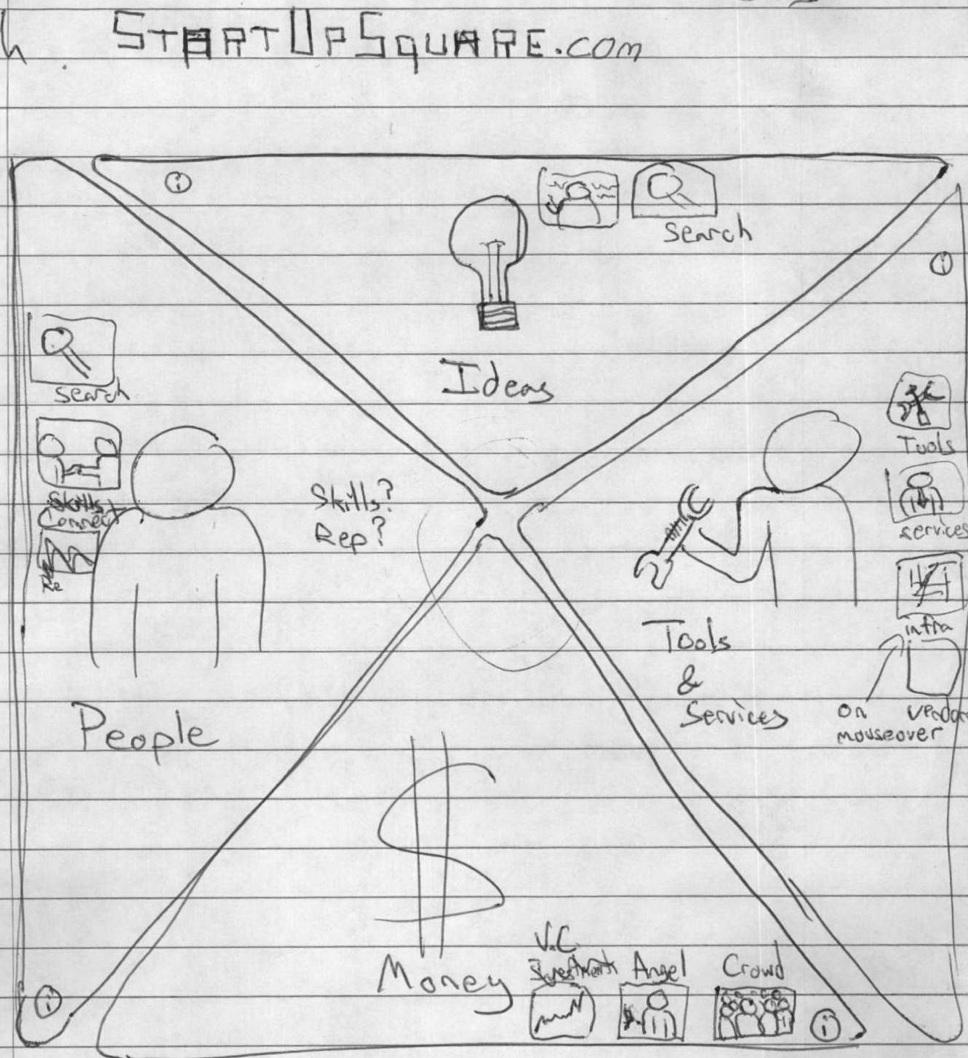
 Yep…a piece of paper. With all the advantages of Balsamiq plus a clear price differential, a piece of paper is the clear winner. It’s easy to modify (if you have a pencil and an eraser), easy to share (take a photo if you want to share it on-line), and zero load time or dependancies. You’re doing a wireframe. It shouldn’t be complicated. You could have drawn three in the time it took to read this blog post. Even a terrible 2 minute sketch like my original one for startupSQUARE can convey the basics and give you a good starting point for discussion.
Quick Answer: The three best usability testing tools for wireframes are sticky notes on paper (#1), plain paper (#2), and Balsamiq (#3). Low-fidelity tools consistently outperform sophisticated software because they keep customer conversations focused on functionality and information architecture rather than visual details like colors or rounded corners. As product managers, we could sketch three wireframes in the time it takes to boot up a digital tool — simplicity forces focus on what actually matters.
1) A piece of paper with multi-colored sticky notes on top
A distinct improvement on the vanilla piece of paper, sticky notes allow you to move the buttons and widgets around more easily, and if you use a big enough marker (a fine point sharpie) then you won’t draw too much detail. That simple restriction will force you to think about the most important aspects instead of letting your sketch move quickly into a discussion of rounded corners.
Honorable Mention: Photoshop
Photoshop gets an honorable mention for being good when you need to go to a full mockup. Clever use of folders and layers will allow you to mockup what happens when you click certain buttons easily. You can even do a screencast this way and fake a whole product demo for great customer feedback and fast iteration. P.S.: Think you’ve got a better tool than a piece of paper? Let me know.
Frequently Asked Questions
What are the best usability testing tools for wireframes and mockups?
The three best usability testing tools for wireframes are: sticky notes on paper (best), plain paper (runner-up), and Balsamiq (third). Low-fidelity tools outperform sophisticated software because they keep conversations focused on functionality and information architecture rather than visual details like colors, shading, or rounded corners. Photoshop earns an honorable mention for full mockups.
Why is Balsamiq good for usability testing?
Balsamiq works well precisely because its outputs look hand-drawn and sketchy. This visual roughness prevents customers from commenting on superficial details like colors or corner rounding, keeping feedback focused on whether users can find buttons and understand the information being conveyed. As a bonus, we can link several mockups together to create a crude but clickable prototype.
Why use paper wireframes instead of digital wireframing tools?
Paper wireframes offer all the advantages of tools like Balsamiq — keeping focus on functionality over aesthetics — plus they’re free, have zero load time, require no dependencies, and are easy to modify with just a pencil and eraser. As product managers, we could sketch three wireframes in the time it takes to boot up a digital tool. Even a rough two-minute sketch provides a strong starting point for discussion.
How do sticky notes improve paper wireframing for usability tests?
Sticky notes on paper let us move buttons and widgets around easily without redrawing the whole wireframe. Using a thick marker like a fine-point Sharpie forces us to keep things simple — we can’t draw too much detail, which keeps the focus on the most important aspects of the design rather than letting the conversation drift into minor visual discussions.
When should you use Photoshop for wireframing instead of paper?
Photoshop is best reserved for when we need to move beyond low-fidelity wireframes into full mockups. Clever use of folders and layers lets us simulate what happens when users click certain buttons. We can even create screencasts to fake an entire product demo, which is valuable for gathering customer feedback and iterating quickly before writing any code.

Comments
Loading comments…
Leave a comment